Meet the New Orca Advisor Dashboard: Where You Stand and What's Next
Orca Advisor has a new home screen. The Dashboard shows plan progress, estimated business value, QuickBooks financials, and what to do next on one customizable page.
We are excited to share the new Dashboard with you!
When you log in, you'll be greeted by a whole new experience that connects information from your QuickBooks file, tracks the tools that are in process, what's coming up next, and allows you to easily pick up where you left off. The Dashboard is also fully customizable so you can move cards around as you like.
Your Action Plan is also still available in the left menu if you want to see it in full.
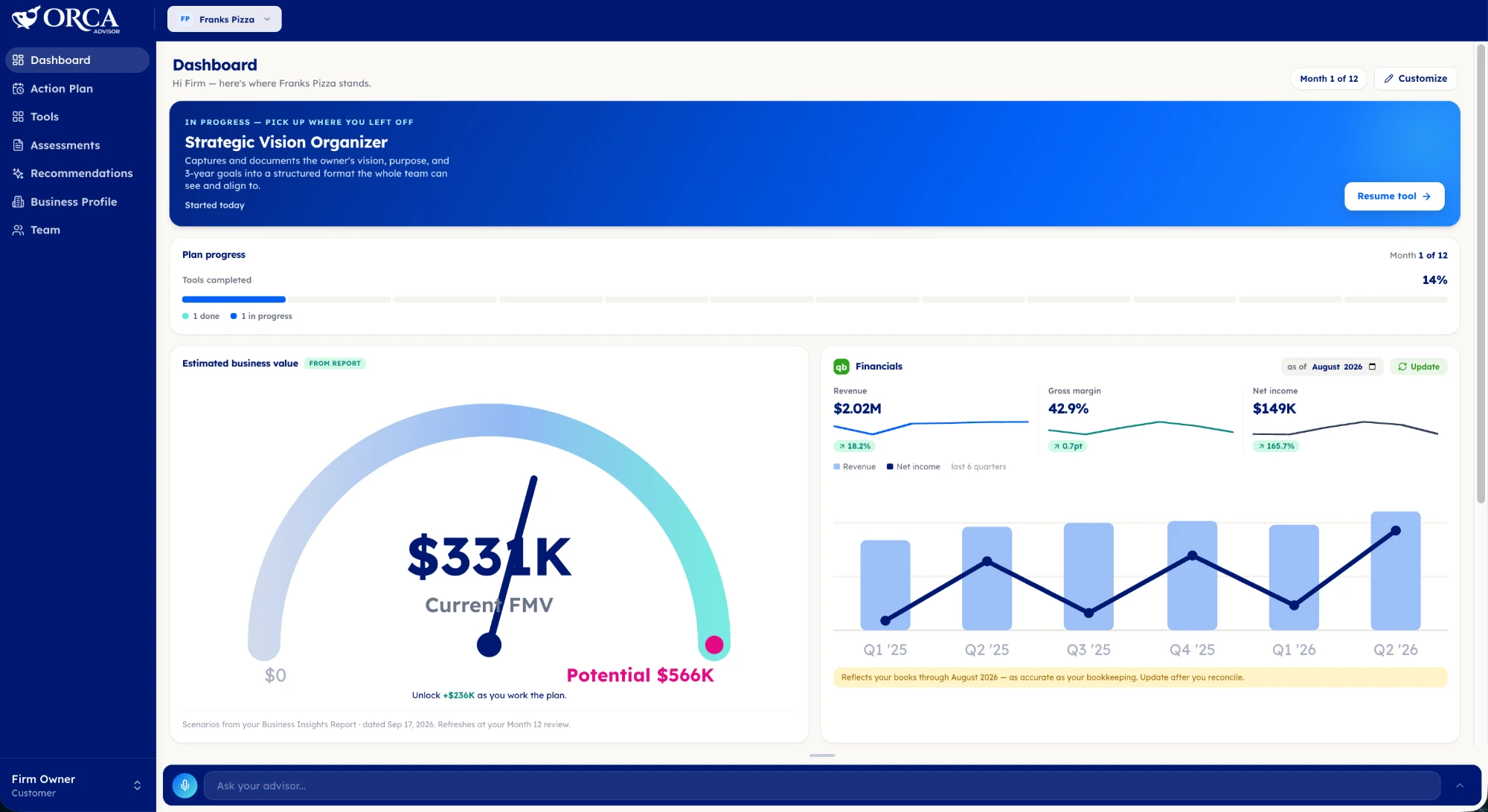
What You See When You Log In
The Dashboard is a set of cards that each answer a specific question. Together they give you a clear picture of where you are in your plan, what's next, what you are working toward, and how the business is performing.
Here is what is on the screen today.
Pick up where you left off. The banner at the top shows the tool you are in the middle of, a short description of what it does, and a Resume tool button. If you started the Strategic Vision Organizer on Tuesday and got pulled into a customer problem, it is waiting for you.
Plan progress. Which month of the 12-month plan you are in, the percentage of tools completed, and a count of what is done and what is in progress. It is a simple bar, and that is the point. You should be able to tell in one glance whether you are on pace.
Estimated business value. A gauge showing your current fair market value against the potential value identified in your Business Insights Report, with the gap between them stated plainly as the value you unlock as you work the plan. The scenarios come from your report and refresh at your Month 12 review, so this card is a reminder of why the plan exists, not a number that moves every day.
Financials. Revenue, gross margin, and net income pulled from QuickBooks, each with a trend, plus a six-quarter chart of revenue and net income. This card does not auto-sync. We have learned that QuickBooks numbers are rarely accurate to the minute, so we put you in control of syncing. You choose when the information comes over, so it only arrives when it is correct and relevant. The card tells you which month the books run through, and the Update button is there for after you reconcile. It also says something every financial dashboard should say out loud: the numbers are only as accurate as the bookkeeping behind them.
Key numbers. Your revenue and profit targets. This card starts empty and fills in once you complete the Strategic Vision Organizer, because a target you have not set yet is not a target.
Up next and in progress. The tools scheduled for the coming months, labeled Active, Up next, or by month, so you can see the sequence of the work rather than just the current step.
Recently completed. What you have finished, when it was delivered, and an Open button to go back to it.
Along the bottom, always available, is the Ask your advisor bar. Whatever card raises a question, you can ask it right there without leaving the page.
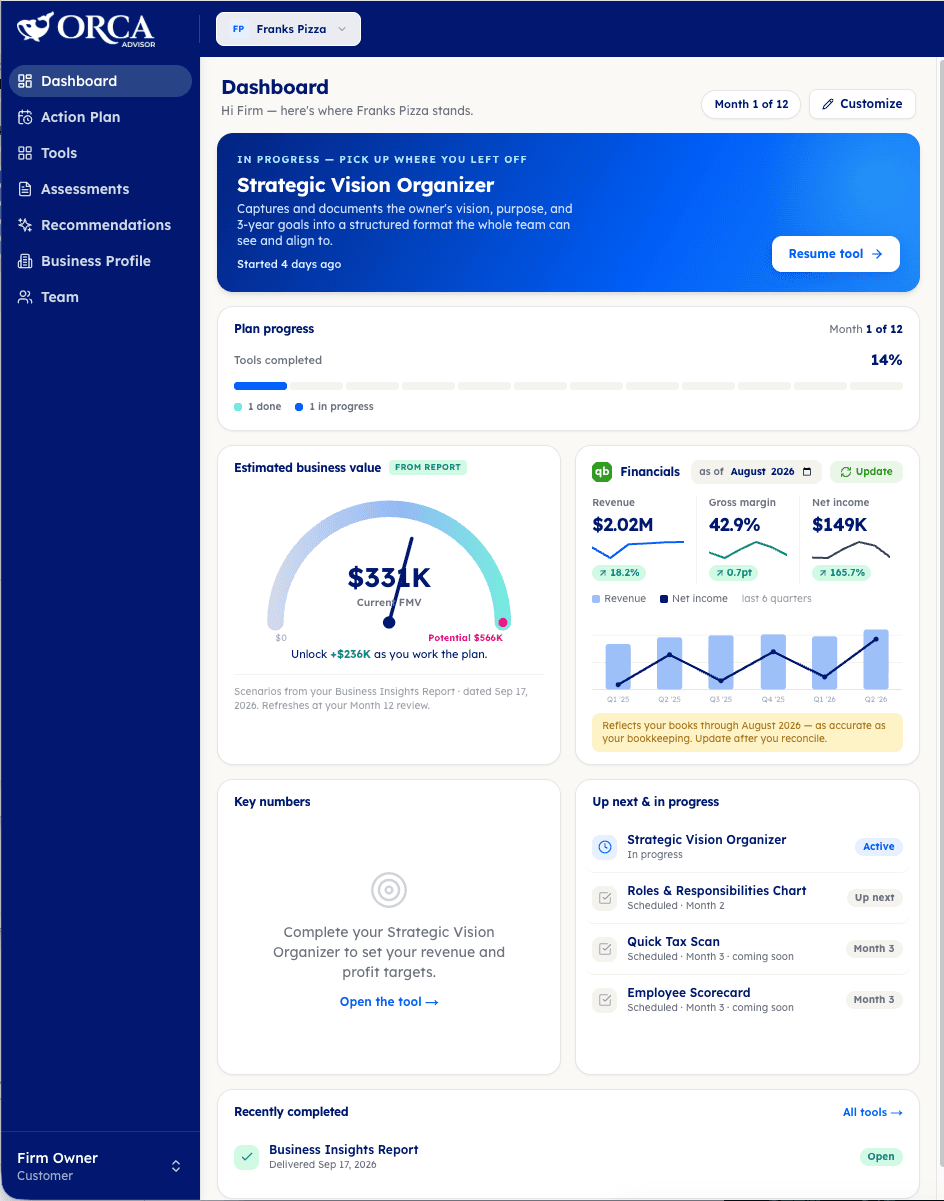
Make It Yours
Not every owner cares about the same cards in the same order. The Customize button in the top right lets you add cards, remove them, and change their size. If the value gauge is what keeps you motivated, make it big. If you want financials front and center and progress tucked below, move them.
Nothing Was Taken Away
The Action Plan you have been using is still in the left menu, exactly where it was. If you prefer that view, keep using it. The Dashboard is an addition, not a replacement.
If You Advise Owners
If you work with clients through Orca Advisor, you see the same Dashboard for each client business and switch between them from the top of the screen. It gives you and your client a shared starting point: their plan, their numbers, and the next tool on the schedule, on the same screen they see when they log in.
Why a Home Screen Matters
We have written before that hope is not a strategy, and that a vision only works when it becomes an operating filter. Both ideas depend on the same thing: the plan has to be visible. Not in a binder, not in a spreadsheet you open once a quarter, but in the place you already go when you sit down to work on the business.
That is what the Dashboard is for. Log in, see where you stand, and pick up where you left off.

Co-Founder & CEO, Orca Advisor
Jacob Schroeder, CPA, is the Founder and CEO of Ascend Consulting and Co-Founder & CEO of Orca Advisor. Initially Jacob started working with business owners to assist with tax filing and compliance but found that his real passion is helping business owners scale what they are passionate about. He delivers that hands-on through Ascend, and is building Orca to redefine advisory and make it accessible to accountants and business owners at scale. Jacob holds Associate's, Bachelor's, and Master's degrees in Accounting, has been a CPA since 2013, and has served on the Intuit Accountant's Council.